Read more at:
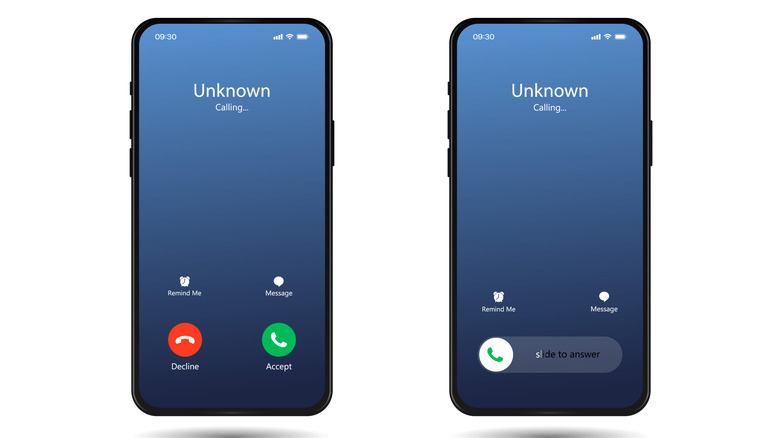
Your iPhone sometimes shows an option to decline calls, and in other instances, you only see a “slide to answer” option to pick up calls with no button to reject them. This is one of the worst parts of iOS, and even long-time iPhone users don’t know that it’s a feature working in their favor. The Accept and Decline options appear only if the iPhone is unlocked. When it’s locked, you can only slide to answer.
The simple reason behind this is to prevent accidental inputs, whether it’s picking up or declining a call. When your iPhone is locked, it’s assumed that you are not actively looking at the display. It could be in your pocket, your bag, or on a table right in front of you.
Now imagine if the Accept and Decline options appeared on the lock screen and your iPhone rang. You could easily tap on one of them while pulling the phone out of your pocket or picking it up from the table. To avoid this, Apple replaced those options on the lock screen with the “slide to answer” option. With the latter, even a few inadvertent taps on the screen won’t do any harm. It will neither pick up nor reject the call, but you can still decline calls from the lock screen.
Use the side button to decline calls
When Apple removed the Decline option from the iPhone lock screen, it moved it to the side button instead of entirely removing the functionality. You can still reject calls by simply pressing the side button (also called the power button or lock button) twice. Pressing it once will instead silence the call. Doing so is much more convenient, as you can quickly decline a call without even looking at the screen, especially when you don’t want to pick up the phone.
It’s one of those Apple decisions that feel confusing at first, but once you get to know the logic, things start to make sense. And it’s not like this has always been the case. Until iOS 5, incoming calls looked the same, irrespective of whether the iPhone was locked or unlocked. Starting with iOS 6, Apple introduced the “slide to answer” screen. Even many Android devices later adopted a similar approach to prevent users from accidentally picking up or declining calls.



