Read more at:
Although it isn’t cheap at $129, Apple TV is one of the best streaming devices on the market. Despite being introduced nearly four years ago, the 3rd-gen Apple TV 4K is still worth buying in 2026. It has a powerful processor and a snappy interface that’s devoid of advertisements, unlike most of the competition. Another upside is the ability to prevent your Apple TV from spying on you, as opposed to most of the smart TVs on the market.
Perhaps more importantly, the operating system and processor aren’t the only things to appreciate about the Apple TV; it has several cool features that can enhance your viewing experience. Some of these options, such as running a FaceTime call on your Apple TV, using your iPhone as a keyboard to enter text, or employing HomePods as your Apple TV speakers, are widely known. However, there are several other cool things the Apple TV can do that you might not know about, like enhancing dialogue and operating as a smart home hub. Here’s a look at some of these lesser-known features.
It can enhance dialogue for better clarity

If you’re having trouble hearing characters talking while watching shows or movies, maybe due to the background music or overly quiet speech, there is an Apple TV setting that can fix this quiet dialogue issue. Known as Enhance Dialogue, this feature can make speech more prominent without dramatically altering the overall audio mix. If that’s not enough, there is also the option to Enhance More, which will increase the speech aspect of the audio mix further.
You can access the feature by pressing up on the Apple TV remote clickpad ring and selecting audio options, which includes the Enhance Dialogue setting. In addition to this, Apple TV has a Voice Isolation feature that can completely isolate the dialogue and dial down everything else in the audio mix. Voice Isolation needs to be enabled on a system level. You can find it under Settings > Accessibility on your Apple TV device.
Calibrate color balance with your iPhone
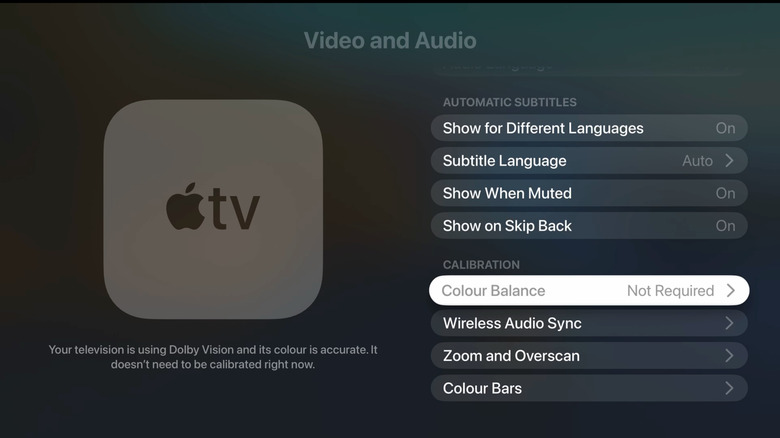
Another cool thing the Apple TV can do that you maybe didn’t know about, is using an iPhone to calibrate the colors. Although this is not the same thing as getting your TV professionally calibrated, it is a good alternative for folks who don’t plan to spend money hiring a pro, but aren’t happy with how the colors look when they’re using Apple TV. You need an iPhone with Face ID support and iOS 14.5 or newer for this.
It doesn’t change any of the TV’s actual settings; instead, it changes how Apple TV sends visuals to your display so that they appear more balanced while watching. So be aware, when you’re using a source other than Apple TV, you won’t see these calibrated colors. You can find the option under Settings > Video and Audio > Calibration. Apple TV can also show color bars, which are available under Calibration, to use when you are manually adjusting the colors, tint, and other picture settings to make them look more natural.
Function as your smart home hub
Another cool thing that certain Apple TV models can do is act as a Matter controller and Thread border router for your smart home accessories. If you have Matter-compatible smart home devices, they can be setup to view up in the Home app on your iPhone, with Apple TV acting as a home hub. Similarly, you won’t need a separate bridge to use smart home gadgets featuring the Thread protocol. Notably, Thread support is missing from the 64 GB model of the Apple TV 4K.
In other smart home-related features, you can see a picture-in-picture view of the feed from HomeKit-compatible smart devices, like video doorbells, on your Apple TV. You can ask Siri to show you the feeds from any of your HomeKit-compatible cameras on the Apple TV screen, or access the full camera grid using the control center. Moreover, the Apple TV control center gives you quick access to trigger Scenes, and the device can handle smart home automations as long as it’s powered on and in standby mode.



